Coo vs Nara Baby
Last checked 8 November 2026. Sources are numbered in the table and listed at the end.
In short
Coo and Nara Baby both log feeds, sleep and diapers on iPhone and Apple Watch, and both let caregivers share one log.
Coo is free with everything included. You log with single taps instead of timers, get an Undo after every change, and share through iCloud with no account.
Nara Baby is a paid app after a 7-day free trial, at $9.99 a month or $99.99 lifetime. Without a plan you can view and export your log, but you can’t add to it. It goes further than Coo on pregnancy and postpartum tracking, multiple children, solids and Android.
 Free. No ads. No sign-up.
Side by side
| Feature | Coo | Nara Baby |
|---|---|---|
| Logging | ||
| Hands-on time for a 30-minute feed | About 2 seconds: tap “Feeding started”, put the phone down, tap “Feeding ended” later. If you forget the end, Coo works it out. | Start the breastfeeding timer for a side and stop it later, from the app, a Live Activity or Siri. Or add the entry without a timer and type the times. 13 |
| Anything left running? | Never. Every log is a moment, so there is no timer to forget. | Sleep, breastfeeding and pumping use timers that run until someone stops them. 1 |
| Missed a tap | Coo fills the obvious gaps, like ending a feed when baby falls asleep or adding “woke up” before a night feed. What it adds is marked, and your own logs always win. | You type the correct duration into the entry. Timers past normal limits, such as sleep over 24 hours, get a red mark so you can find them. 3 |
| Tapped the wrong thing | An Undo button after every log, edit or delete, going back up to 10 changes. Widget and Watch taps get Undo too. | We couldn’t find an Undo in its listing or FAQ. Its FAQ describes editing entries by opening them. 13 |
| Fix a wrong time | Drag the event to the right time, or tap the time and type 3 digits. | Open the entry and tap the Start time row, or tap the hour or minute to type a duration. 3 |
| Apple Watch | Free. One tap on a watch-face complication logs sleep, waking, or a feed starting or ending, with Undo. A diaper takes one more tap to pick the type. | Supported, on watchOS 8.1 or later. Included in both paid plans, so it needs a subscription or lifetime purchase after the trial. 13 |
| Siri | Free and built in. Say “Log in Coo” with no setup, or put a log on the Action Button. | Built in for diapers, bottles, breastfeeding, pumping and sleep. Siri asks follow-ups, and it needs an internet connection. 3 |
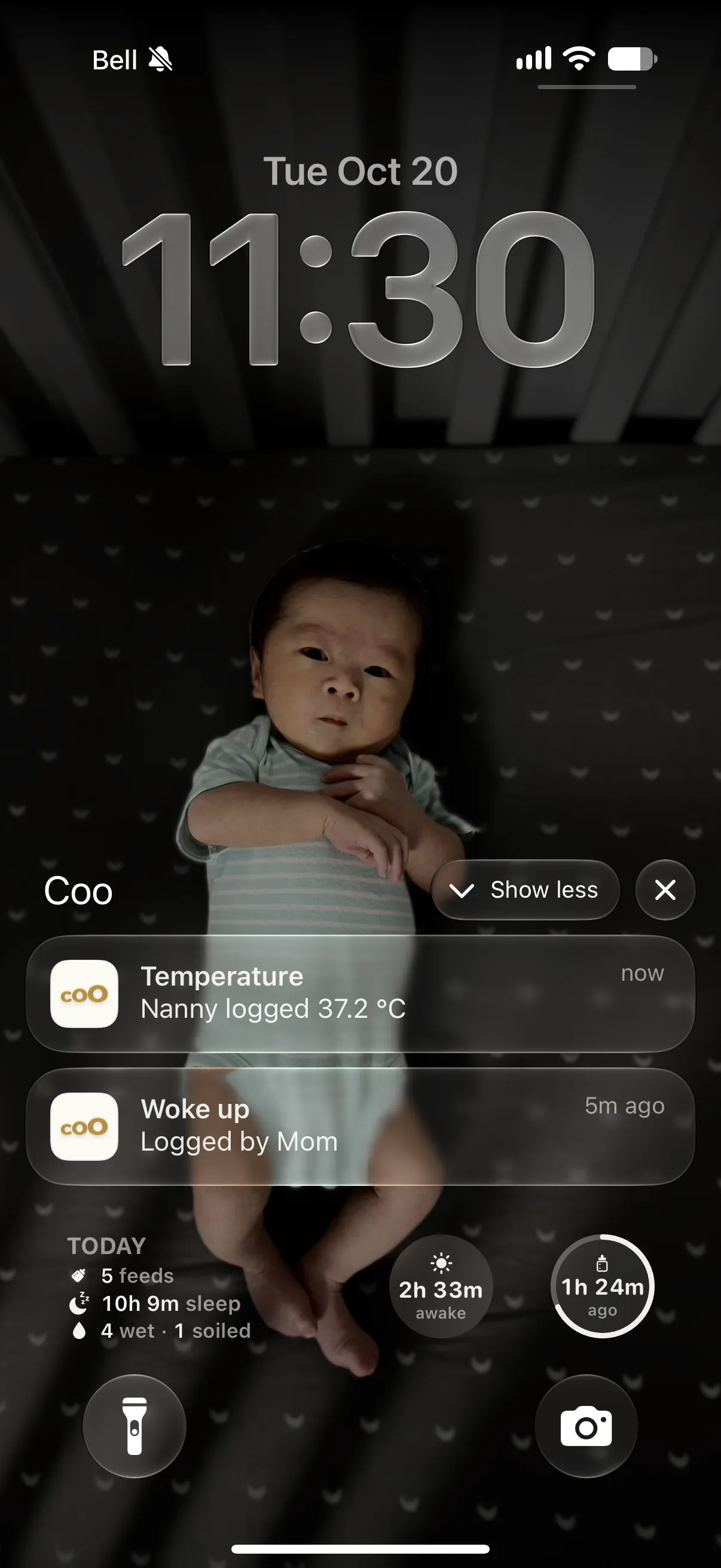
| Home Screen and Lock Screen | Free widgets for one-tap logging, plus last feed, awake time and today’s totals on the Lock Screen. | Live Activities show running timers on the Lock Screen. Its release notes mention widgets, but we couldn’t find what they log. 13 |
| Your data in and out | ||
| Import from other baby trackers | Huckleberry, Baby Tracker and PiyoLog files, plus pasted notes and an AI prompt for any other app’s export. | We couldn’t find an import from other apps in its listing or FAQ. 13 |
| Export | Everything or any one week, as CSV or text, any time. | CSV for one child at a time, from the Activity screen → child’s avatar → Export Data. We couldn’t find a limit on how often. 3 |
| Sharing, price and privacy | ||
| How a partner joins | Share an iCloud invite. | Invite by email from the Family tab. The caregiver creates an account with that same address and joins. 34 |
| Account | Not needed. Sharing is managed by iCloud. | Required. Nara asks each person to register with their own email and password. 34 |
| What a caregiver can do | Log from their own Apple ID, with no password to pass around. | Full access once added, the same as you. The account that created the family can remove them. 3 |
| Price | Free. Every feature, no in-app purchases, no ads. | Paid after a 7-day free trial, with no card needed to start. $9.99 a month or $99.99 lifetime, with occasional promotions; the App Store also lists Monthly $6.99 and Lifetime $49.99–$79.99. Without a plan you can view and export, but not add new entries. 13 |
| Who pays | Nobody. | One payment covers the whole family and every caregiver in it. Two households in separate app families each pay. 3 |
| Ads | None. | None, per its FAQ. 3 |
| Privacy | No tracking and no ads. Your log lives on your devices and in your own iCloud. If you turn on a web link for a caregiver, that link’s last 24 hours pass through our server. | Its App Store label lists usage data used to track you across other companies’ apps, plus name, email, photos, user ID and usage data linked to you. 1 |
| Platforms | iPhone and Apple Watch. No Android app or iPad version. | iPhone, Apple Watch and Android, plus Apple silicon Macs. The App Store listing doesn’t show iPad. 12 |
| Languages | English and Simplified Chinese. | English. 1 |
| Where Nara Baby goes further | ||
| Pregnancy and postpartum | Not offered. Coo tracks the baby only. | Tracks your own vitals, physical and mental health, appointments and journal notes during pregnancy and postpartum. 1 |
| Multiple children and twins | One baby per log. | Built to track and compare multiple children or twins. 1 |
| Solids | Logged as a custom event with a note. | Built in, with dozens of first foods preloaded. 1 |
| Nap reminders | No reminders. Coo can predict the next nap or bedtime, free and off by default (Profile → Features). | Recurring reminders on wake windows or fixed times, which you set up and adjust. These are schedules you choose, not predictions. 3 |
| Growth | WHO or China (WS/T 423) percentiles, with age corrected for babies born early. | WHO growth charts and percentiles. 3 |
A tinted cell marks the app that does better on that row.
A 30-minute feed, step by step
Both apps take two taps. The difference is what happens in between, and what happens when you’re too tired to finish.
Coo
- Tap “Feeding started” on the widget, the Watch or in the app.
- Put the phone down. Nothing is running.
- Tap “Feeding ended” when you’re done. Coo works out the 30 minutes.
- Fell asleep first? Coo ends the feed for you and marks the end it added.
Nara Baby
- Tap the breastfeeding timer for a side.
- The timer runs, with a Live Activity on the Lock Screen.timer running
- Come back and stop it, from the app, the Live Activity or Siri.timer running
- Forgot to stop it? Open the entry and type the right duration.
Tapped the wrong thing?
At 3 a.m., mis-taps happen. Coo is built to take them back in a second.
Coo
- Every log, edit and delete shows an Undo button. It goes back up to 10 changes.
- Off by a few minutes? Hold the event and drag it to the right time.
- Or tap its time and type it: three digits, like 9 3 0.
Nara Baby
- Find the entry in the log and open it.
- Tap the Start time row, or the hour or minute, to correct it.
- We couldn’t find an Undo in Nara’s listing or FAQ.
Who pays, and for how long
Coo costs nothing, and there is nothing to buy inside it: no trial, no plan and no ads.
Nara Baby’s FAQ says it’s a paid app: $9.99 a month or $99.99 lifetime, with one payment covering the whole family and a 7-day free trial that starts with your first log. If you don’t subscribe, you can still view and export what you logged, but you can’t add new entries. If a subscription lapses, the whole family becomes read-only.
Your partner, on their own phone
Coo shares through iCloud, like a shared note. Invite a partner, grandparent or nanny, and each of them logs from their own Apple ID. There’s no account to create and no password to pass around.
Nara Baby invites caregivers by email, and each one creates a Nara account with that address. Once in, they have the same access you do.
Moving your log out
Nara Baby exports one child’s data as a CSV from the Activity screen. We couldn’t find an import from other apps in its listing or FAQ.
Coo exports everything or any one week as CSV or text, and reads Huckleberry, Baby Tracker and PiyoLog files, plus pasted notes. Coo has no dedicated Nara importer yet, so moving from Nara means using the AI prompt, as below.
Which one fits your family?
Choose Nara Baby if…
- You want to track your own pregnancy or postpartum health in the same app.
- You have twins or more than one child and want them in one app.
- You’re starting solids and want preloaded foods.
- Someone in the family uses Android, or you want wake-window nap reminders.
Choose Coo if…
- You want everything free, with nothing to buy, ever.
- You’d rather tap once and walk away than start and stop a timer.
- You want an Undo after every change.
- You’d rather share through iCloud than make an account.
- You’re moving from Huckleberry, Baby Tracker, PiyoLog or notes and want to keep your history.
Switching from Nara Baby
- In Nara Baby, open the main Activity screen, tap the avatar next to your child’s name and tap Export Data. That saves a CSV for that child.
- In Coo, go to Profile → Import Events → Other apps or your own notes, and tap Copy AI Prompt.
- Paste the prompt and your CSV into any AI chat, then paste its answer back into Coo.
- Coo shows what it will bring in before anything changes. Coo has no dedicated Nara reader yet, so check that preview closely.
Questions parents ask
Is Nara Baby free?
Only for a 7-day trial. Nara’s FAQ says it’s a paid app, at $9.99 a month or $99.99 lifetime. After the trial you can view and export what you logged, but you can’t add new entries until you subscribe. The App Store also lists other monthly and lifetime prices. Coo is free with every feature.
Does one Nara Baby plan cover my partner?
Yes, per Nara’s FAQ: one payment covers everyone in your app family. If two households keep separate app families, each one needs its own paying member. Coo needs no payment for anyone.
Is Nara Baby on Apple Watch and Android?
Yes to both. Its App Store listing supports Apple Watch on watchOS 8.1 or later, and it’s on Google Play. Coo is on iPhone and Apple Watch only, with no Android app. Caregivers without an iPhone can log through a web link.
Does Nara Baby have timers?
Yes. Its listing describes sleep, breastfeeding and pumping timers, and its FAQ says you can also add an entry without one. Coo has no timers: you log moments like “feeding started” and “feeding ended”, and Coo works out how long it lasted.
What if I tap the wrong thing?
In Coo, every log, edit and delete shows an Undo button, going back up to 10 changes. We couldn’t find an Undo in Nara Baby’s listing or FAQ; its FAQ describes opening an entry to correct it.
Can I track pregnancy in Coo?
No. Coo only tracks the baby. Nara Baby tracks your own health during pregnancy and postpartum, so it’s the better fit if you want that in one app.
Can I track twins in Coo?
Coo keeps one baby per log. Nara Baby’s listing says it’s built to track and compare multiple children or twins, so it’s the better fit today.
Can I export my data from Nara Baby?
Yes. Its FAQ says to open the Activity screen, tap the avatar next to your child’s name, and tap Export Data, which saves a CSV. Coo exports everything or any one week as CSV or text, any time.
Can I move my Nara Baby data to Coo?
Yes, through Coo’s AI prompt. Export a CSV from Nara Baby, copy Coo’s AI Prompt into any AI chat with that file, and paste the answer into Coo under Profile → Import Events → Other apps or your own notes. Coo shows a preview before anything changes.
Is Coo on Android or iPad?
No. Coo is on iPhone and Apple Watch only. Nara Baby is on iPhone, Apple Watch and Android.
Does Coo predict naps or coach sleep?
Coo can predict the next nap or bedtime, as a free option you turn on in Profile → Features. It doesn’t coach sleep or send nap reminders. Nara Baby has reminders built on wake windows you set yourself.
Sources
Checked 8 November 2026. Prices are US App Store prices and may change. Where we couldn’t find something in Nara Baby’s listing or help center, we say so instead of guessing. Spot a mistake? Tell us through Support and we’ll fix it.
- Nara Baby & Pregnancy Tracker on the App Store: description, in-app purchases, privacy label, languages, compatibility
- Nara Baby & Pregnancy Tracker on Google Play
- Nara Baby: Frequently Asked Questions
- Nara Baby: Join your family
Nara Baby is a trademark of Nara Organics, Inc.. Coo isn’t affiliated with or endorsed by Nara Baby.
Coo is free on iPhone and Apple Watch.