Coo on Apple Watch
An Apple Watch baby tracker that logs from your wrist
Coo’s Apple Watch complications log a baby’s feeds and sleep with one tap on the watch face, and a diaper with two. The Watch is free, with no subscription. Your tap goes to your iPhone and on to anyone you share the log with.
 Free. No ads. No sign-up.
How to log from your Apple Watch
- Install Coo on your iPhone and paired Apple Watch, then open it on the iPhone so the Watch gets the latest times.
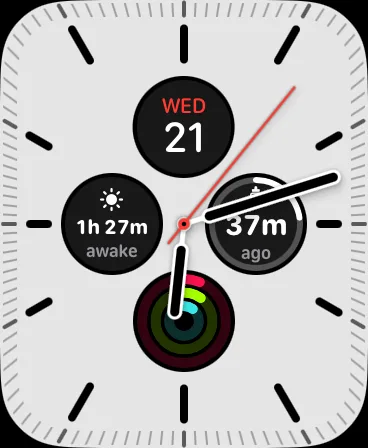
- Add Coo’s Feed, Sleep and Diaper complications to a watch face.
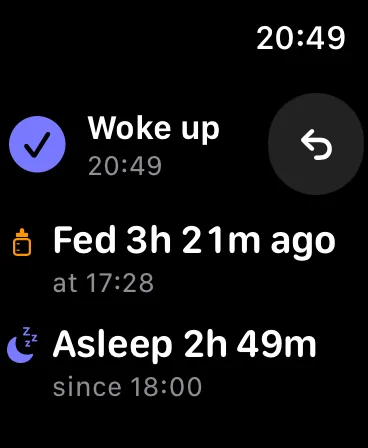
- Tap Feed or Sleep. Coo logs whichever half comes next: a feed’s start or end, or asleep or woke up.
- Tap Diaper, then pick Wet, Soiled or Both.
- Your wrist taps back, and a check mark and an Undo button stay up for 10 seconds.
What the complications show
Coo has four. Feed shows the time since the last feed and, if you logged a side, the next one. Sleep shows how long your baby has been asleep or awake. Diaper shows the time since the last change. Now, for the large slot and the Smart Stack, shows both clocks and today’s feeds, sleep and diapers.
When your iPhone is out of reach
A tap is stamped with its time on the Watch and waits there until your iPhone is back. The iPhone then logs it at the original time and syncs it through iCloud. Meanwhile the Watch already counts from your tap.
What’s different about Coo on Apple Watch
It’s free, like every other Coo feature, with no account. Huckleberry’s Watch app needs a Plus or Premium membership.
Coo logs moments, so no timer is left running on your wrist. Tap when a feed starts and when it ends, and Coo works out how long it lasted. If you log “asleep” during a feed, Coo ends the feed for you and marks what it added.
What the Watch doesn’t do
- It needs an iPhone. The Watch keeps no log of its own, so Coo can’t be used on an Apple Watch alone.
- You log from the complications. The Coo app on the Watch shows clocks and today’s totals and has no log buttons of its own, and the Now complication only opens it.
- A complication can’t run a button on the watch face, so each tap briefly opens Coo on the Watch, which logs as it opens.
- What the Watch shows is as of the iPhone’s last update, and the app says when that was. Before the first update, Feed and Sleep just open the app.
- The Watch logs feeds, sleep and diapers only. Sides, bottle amounts, pumping, medicine and notes are added on the iPhone.
- Coo has no Android app, no iPad app and no sleep coaching.
Apple Watch questions
Is there a free baby tracker for Apple Watch?
Yes. Coo is a free baby tracker for iPhone and Apple Watch, with no subscription, in-app purchases or ads. Its watch-face complications log feeds, sleep and diapers.
Can I log on the Apple Watch when my iPhone isn’t nearby?
Yes. Coo holds the tap on the Watch with the time you made it. When the iPhone is back in reach, it logs the event at that original time. Coo can’t be used without an iPhone at all, because the log lives there and in iCloud.
Can I record a breast side or a bottle amount on the Apple Watch?
No. The Watch logs that a feed started or ended. Coo shows the next side on the Watch if you logged one, but you set sides and bottle amounts on the iPhone.
What if I tap a Coo complication by accident?
After each tap, Coo on Apple Watch shows what it logged and an Undo button for 10 seconds. Undo takes the event back on the Watch and on the iPhone.
Does Coo work on Wear OS or Android?
No. Coo runs on iPhone and Apple Watch only. A caregiver with an Android phone can log through a web link that the parent sends from Coo.
Coo is free on iPhone and Apple Watch.