For nannies, grandparents and helpers
Let a nanny or grandparent log the baby without an app
Coo lets a nanny or grandparent log feeds, sleep and diapers from a web link that opens in WeChat or any browser. They don’t need an iPhone, the app, an account or a password. If you choose to share a web link with a caregiver, they can see your baby’s events from the last 24 hours, and only while the link is on, and you can turn it off at any time.
 Free. No ads. No sign-up.
How to set up a web link
- In Coo on your iPhone, go to Profile › Share Log and tap Add Web Link.
- Pick who it’s for (nanny, grandma or another role) and the page language, English or Simplified Chinese.
- Choose their buttons for sleep, feeds and diapers. You can rename and reorder them.
- Send the link, or show them its QR code.
- They tap a big button to log. For a feed they can add a bottle amount, and they can undo their own taps.
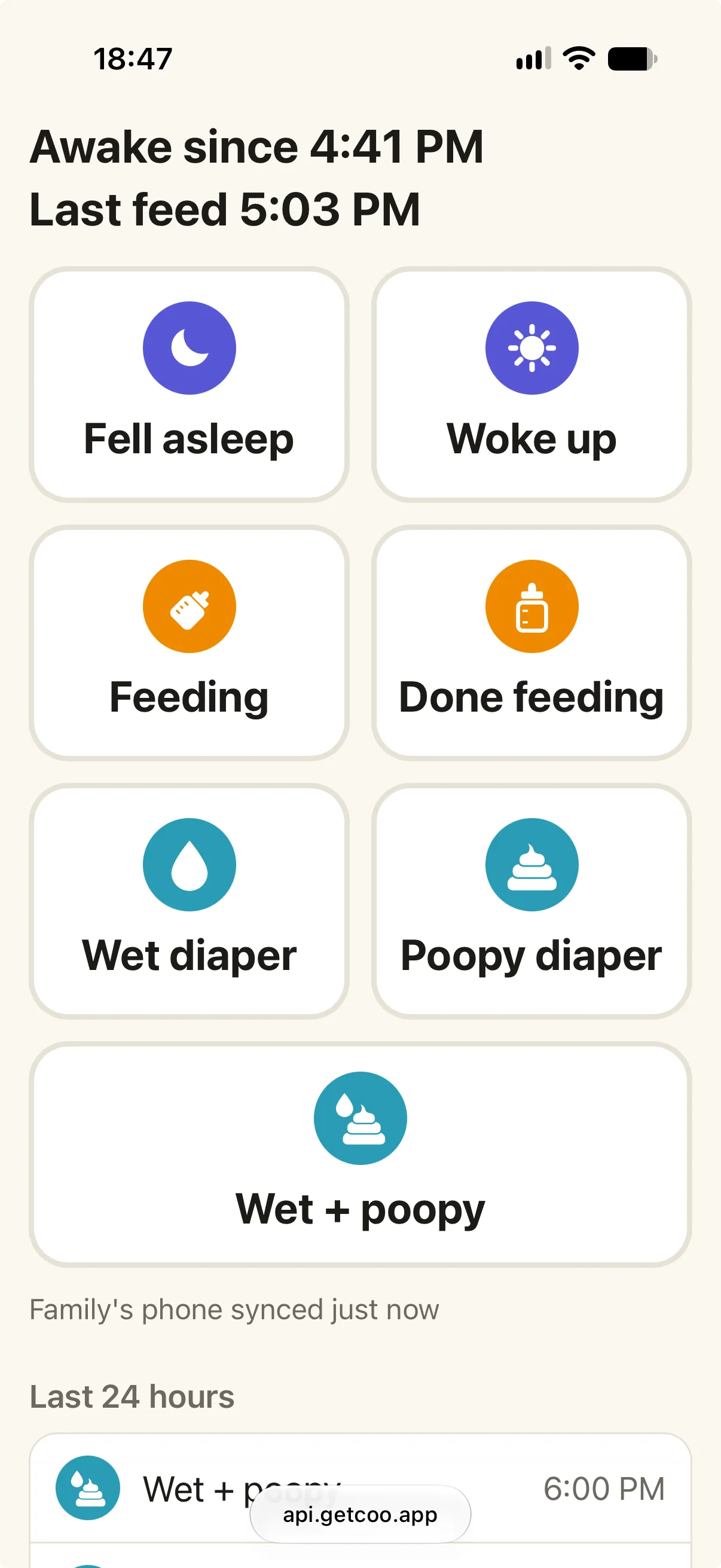
What the caregiver sees
One page with large buttons, what the baby is doing now, and the last 24 hours of the events their buttons log, including when a family phone last synced.
Story, Summary, patterns, growth, photos and notes stay with you. Offline taps wait on their phone and go out when it reconnects.
What you see
Each tap reaches your log as an event by that person, so you can tell who logged it. Taps show up on your Home Screen widgets without opening Coo. If you’ve turned on family alerts, their sleep taps can alert you too.
How you stay in control
Each person gets their own link, managed from Profile › Share Log. Turn it off and the page only says the link is off. Replace it and the old address stops working. Delete it and everything Coo’s server holds for it is removed.
A caregiver who has an iPhone can use the full app instead: invite them to your log through iCloud.
What to know before sharing a link
- Because a browser can’t reach your iCloud, what the caregiver logs and what their page shows go through Coo’s server at api.getcoo.app. A tap waits there until one of your family’s iPhones adds it to your log, and is deleted within 7 days after that. The privacy policy has the full details.
- Coo collects taps when the app opens and in the background when iOS allows, so a tap can reach your widgets before your log.
- Anyone with the link can open the page, so send it only to the person it’s for. It stays on until you turn it off.
- Caregivers log sleep, feeds and diapers only, and every feed they log is a bottle.
- One parent needs Coo on an iPhone to create the link. Coo has no Android app (a caregiver on Android uses the link), no iPad app and no sleep coaching.
Web link questions
Can a nanny without an iPhone log for my baby?
Yes. In Coo, a parent can create a web link for a nanny or grandparent. It opens in any phone browser, including on Android, and they tap big buttons to log sleep, feeds and diapers. Their taps go into the parents’ log.
Does the web link work in WeChat?
Yes. The link opens inside WeChat with no app, account or password. WeChat can’t add a page to the Home Screen, so the page shows how to open it in the phone’s browser for a one-tap icon.
What can a caregiver see through the web link?
If you choose to share a web link with a caregiver, they can see your baby’s events from the last 24 hours, and only while the link is on. They see only the kinds of events their buttons log, along with your baby’s name or the name you set. Story, Summary, patterns, growth, photos and notes aren’t shown.
Where does the data from a web link go?
A browser can’t reach your iCloud, so a web link goes through Coo’s server at api.getcoo.app. It holds the caregiver’s taps, the page’s last 24 hours and the link’s settings, plus random identifiers for widgets and alerts. A tap is deleted within 7 days after a family iPhone adds it to your log, and deleting the link removes everything held for it.
Coo is free on iPhone and Apple Watch.